Portfolio · Dossier Compleet
Client documents in,without chasing anyone.
Every quarter this system requests the documents for the VAT return from your clients, checks every document and only reminds them of what is still missing. You see in one overview who is complete.
Working prototype for accounting offices Built and tested with a made-up office and made-up clients. The software really works.

The problem
Chasing the same things every quarter.
The return itself is not the work. The work is waiting for documents, opening them, seeing that something is wrong and asking again.
The wrong quarter
A bank statement for April to June, when you need July to September. You only see it once you open it.
An unreadable receipt
Photographed crooked and blurred. So you email: could you send it again?
No reply
Two emails later, still nothing. The deadline gets closer and someone has to start calling.
Worked example
What the chasing costs you.
± 180 hours
a year with 100 VAT clients, in this worked example
In the demo with six clients, the system took over this manual work. The minutes each are our assumptions. In a call we redo the sum with your office's own minutes.
| Manual work the system takes over | Times in the demo | Minutes each | Minutes |
|---|---|---|---|
| Write and email the request6 × 5 min | 6 | 5 | 30 |
| Remind a client8 × 4 min | 8 | 4 | 32 |
| Open, check and file a document21 × 3 min | 21 | 3 | 63 |
| Explain to a client what is wrong3 × 6 min | 3 | 6 | 18 |
| Update the status22 × 1 min | 22 | 1 | 22 |
| Total, six clients | 165 |
That is 27.5 minutes per client per quarter on average. With 100 clients and four quarters: 100 × 4 × 27.5 minutes, about 183 hours. A worked example with our assumptions, not a measurement at an office.
International research: in a survey of 816 firm owners, collecting client documents came out as the biggest bottleneck, ahead of manual admin work. Source: Financial Cents, State of Accounting Workflow Automation (2025), mostly firms in North America.
How it works
From request to complete file.
-
One click, and every client knows what is needed
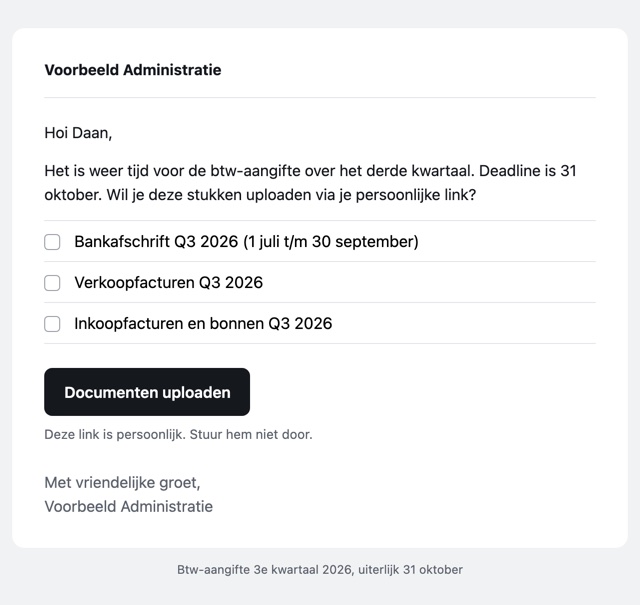
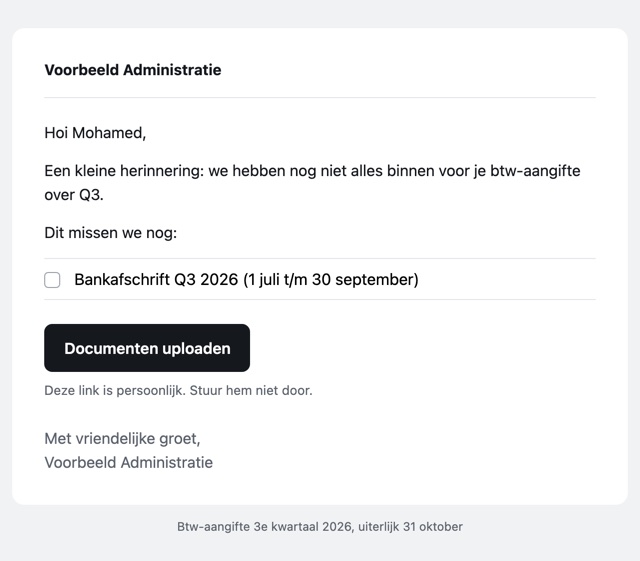
At the start of the quarter every client gets an email with a personal upload link and a short list: bank statement, sales invoices, purchase invoices and receipts.
-
Every document is read straight away
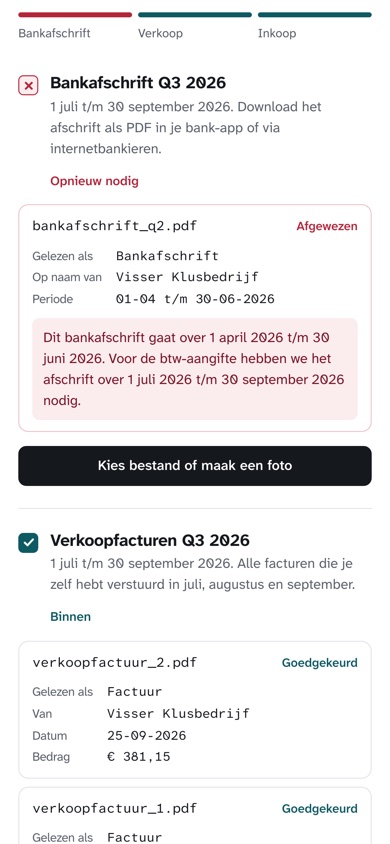
Whatever the client uploads is read right away: what kind of document it is, whose name is on it, which period it covers and the amount. That happens on the office's own computer.
-
Something wrong? The client hears why, right away
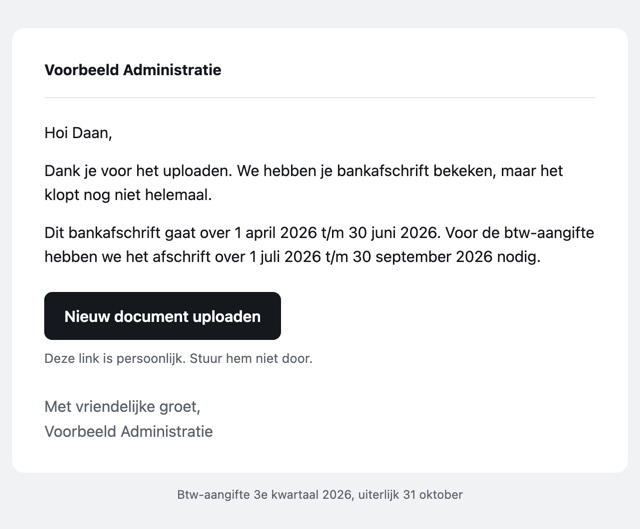
A statement for the wrong quarter, a blurred photo or an energy bill instead of a bank statement goes back, with an explanation the client understands. Nobody at the office has to open it first.
-
Doubt goes to a staff member
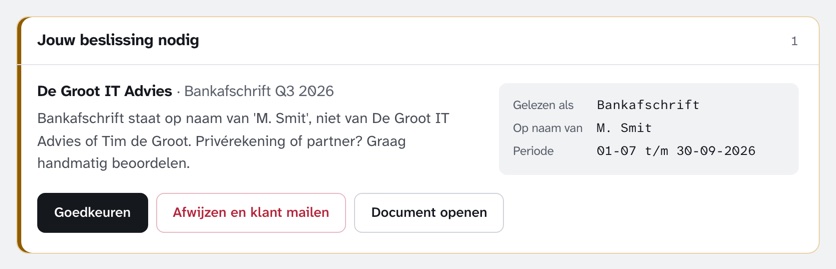
A statement in another name, or a date that can't be read? Then someone at the office decides, with one click. When in doubt, the system never approves on its own.
-
Reminders go out by themselves, only for what is missing
On day 3, 7 and 14 the client gets a reminder listing only the documents still missing. Anyone who still sent nothing goes on the call list. Amounts and VAT go to the bookkeeping as a file.


Measured, not estimated
Tested on the hard cases.
- 22 of 22
- test documents judged correctly, with the right reason
- 0
- times something was approved wrongly
- 10 of 10
- invoice totals read correctly, including a two-page invoice
| What came in | What the system did |
|---|---|
| A bank statement for the wrong quarter | Back to the client, with the period that is needed |
| A blurred photo of a receipt | Back to the client: take a new photo in good light |
| An energy bill, uploaded as a bank statement | Back to the client: this is not a bank statement |
| A statement in someone else's name | To a staff member, who decides |
| A two-page invoice, with the total on page two | Approved, with the right amount |
Tested on 22 documents we made ourselves: good ones and deliberately wrong ones. These are not real client documents. At an office we first test on your own kind of documents.
Who decides
Why the AI never decides on its own.
The AI reads
What kind of document it is, whose name is on it, which period it covers and the amount.
Fixed rules decide
Fine, back to the client or to a staff member. Every rule has an automated test.
A person when in doubt
If a name doesn't match or something can't be read, the system never approves on its own.
A language model can see text on a blurred photo that isn't there. So the system measures how sharp a photo is by itself, apart from the AI, and suspicious amounts go to a staff member. Doubt costs you a few seconds; a wrong approval would cost far more.
Questions and answers
What you want to know before you call.
Do my clients' documents go to the cloud?
No. The system and the AI run on a computer at your office. No document goes to a cloud service, and not to us either.
Does it work with my bookkeeping software?
The prototype puts the client, date, amount and VAT of every approved document in a file you can open in Excel. We build a direct link to your software when we set it up, if your software allows it.
I already have a client portal. What does this do differently?
A portal makes sure documents come in. This system also checks them: it sees that a statement covers the wrong quarter, tells the client what is wrong and only reminds them of what is still missing. Whether it can work next to your current portal is something we look at together.
What still needs to happen before it runs at my office?
This is a prototype. For use with real clients we set up:
- Login for staff
- Upload links that expire after the deadline
- Encrypted storage of the documents
- A data processing agreement and a retention period
- A test on your own kind of documents, before it goes live
How fast is it?
On an ordinary laptop (Apple M1, 16 GB) reading a document takes about 20 to 50 seconds. In our latest test it averaged 38 seconds, while the laptop was doing other work too. The client does not have to wait: if something is wrong, they get an email.
What does it cost?
You get one fixed price after a short call, once we know how many clients you have and which software you use. How long setting it up takes depends mostly on the link with that software.
What technology is behind it?
- Language model Gemma 3 (4B), running locally through Ollama
- Reads every page of a PDF; of long documents the first and last two
- Fixed decision rules in Python, with 18 automated tests
- Upload page and overview with no outside services
- Email through the office's own mail server
- Amounts and VAT as a CSV file for the bookkeeping
Want this foryour firm?
Fifteen minutes, no deck, no obligation. We tell you honestly what we would build first.